
Learn how to keep your spam filter (and censorship filters) from stopping our communications about events, alerts, and legislation from Health Freedom Idaho.
Health Freedom Idaho Email Whitelist Instructions
Since your Email Provider probably uses some type of overzealous filtering; We ask that you add us to your trusted list of senders, contacts or address book. All also known as “Whitelisting.”
If you do not see an email from info@healthfreedomidaho.com in your Inbox, my email may have mistakenly been sent to your spam folder.
Please open your spam folder and if you find an email from info@healthfreedomidaho.com open it and mark it as “Not spam”…
NEXT: Click your provider below to Whitelist Miste Karlfeldt, Health Freedom Idaho
Popular Apps
Email Clients
Security Apps
Spam Filters
Is your email client or spam filter not listed?
If info@healthfreedomidaho.com is being filtered, try adding Miste Karlfeldt, Health Freedom Idaho to your Address Book or Contact list.
If messages continue to be sent to your junk folder contact your ISP or spam filter application support and ask how to whitelist Miste Karlfeldt, Health Freedom Idaho

Gmail
At times, Gmail mistakenly sends emails you want, to the Spam folder…
If you do not readily find an email from info@healthfreedomidaho.com
Please check your Gmail Spam Folder:
To assure you continue to get emails you asked to receive, Create a Filter
- If you find an email from info@healthfreedomidaho.com in Gmail spam?
- Open the email please.
- Click ‘Dots’ button on the top right, to reveal your choices.

Click Filter messages like this
|
Reply |
|
Forward |
|
Filter messages like this |
Click the button Create filter to open your settings.
From the next menu, please check these options
|
Never send it to Spam |
|
Always mark it as important |
|
Also apply filter to matching conversations |
|
Categorize as: Choose Category… |
Under the “Categorize as: Choose Category…”
- Click the dropdown icon next to “Choose Category…”
- Please select Primary in the next options menu.
|
Choose Category… |
|
Primary |
|
Social |
|
Updates |
|
Forums |
|
Promotions |
Click the blue Create filter button, to save your settings
Now you will always see info@healthfreedomidaho.com in your Primary Inbox tab!
Next, if the email remains open? Please mark the email as “Not spam”
- – If you see an email from info@healthfreedomidaho.com: Open the email please.
- – Click the button on the alert, labeled Report Not spam
 Why is this message in spam? It is similar to messages that were identified as spam in the past.
Report not spam
Gmail Tabs
– If you are using Gmail Tabs such as ‘Promotions’ please open your Promotions tab in Gmail.
- – If you find an email from info@healthfreedomidaho.com in your Gmail Promotions tab:
- – Grab and drag my email to the Primary Inbox Tab.
- – After doing so, you will receive an alert like the one below at the top of your Gmail toolbar.
- – Click Yes in the black alert box at Gmail.
- – This way you will always see info@healthfreedomidaho.com in your Primary Inbox tab…
Conversation moved to Primary. Do this for future messages from Miste Karlfeldt, Health Freedom Idaho?
Yes Undo
Also you can create a filter…
- – If you find an email from info@healthfreedomidaho.com in your Gmail Promotions tab:
- – Open the email please.
- – Click the dots menu on the top left of the email.
Click Filter messages like this.
|
Reply |
|
Forward |
|
Filter messages like this |
Click the button Create filter to open your settings.
Please select Primary in the next options menu.
|
Choose Category… |
|
Primary |
|
Social |
|
Updates |
|
Forums |
|
Promotions |
Click the blue Create filter button, to save your settings
Now you will always see info@healthfreedomidaho.com in your Primary Inbox tab…
Gmail Mobile App
If you are using the Gmail Mobile App on your mobile device, please open the app now
Should you not readily see an email from info@healthfreedomidaho.com, please check the Spam Folder:
Should an email from info@healthfreedomidaho.com appear mistakenly sent to Gmail spam?
Please open the email and Tap the  icon.
icon.
|
Move to |
|
Snooze |
|
Change labels |
|
Mark as not important |
Select “Change labels…”
Check the box next to Inbox

Tap OK to save your settings
Are you are using Gmail Tabs such as “Promotions” please open your Promotions tab in Gmail.
- When you find the email from info@healthfreedomidaho.com
- Tap the menu icon – top right.
- Then select Move to.
- Then select Primary from the list.
|
Move to |
|
Snooze |
|
Change labels |

This should help Gmail to know, you always want to see info@healthfreedomidaho.com in your Primary Inbox tab…

Yahoo! Mail
If you do not see an email from info@healthfreedomidaho.com in your Inbox…
Check your Spam Folder. If an email from info@healthfreedomidaho.com is there?
- – Please open the email.
- – Next click the Not Spam button on the top toolbar.
To ensure delivery: Create a filter to automatically send email from info@healthfreedomidaho.com to your Inbox.
- – Move your mouse over or tap the Gear icon in the top right navigation bar.
- – Select Settings from the list that drops down.
- – Choose Filters located on the left side of the page.
- – Click the Add button on the Filters page.
- – Create a name such as Whitelist in the Filter name field.
- – In the From field leave the default contains selected.
- – Enter our email address Miste Karlfeldt, Health Freedom Idaho in the text box next to Contains…
- – Choose the destination folder to which you would like the message delivered. For example: Inbox.
- – Click or tap Save…
- – You will see in the next screen -Deliver to Inbox if From contains info@healthfreedomidaho.com–
- – Click or tap Save on this screen.
- – You will be returned to your Yahoo! Inbox.

iPhone Mail App
iPhone Mail identifies most junk mail (spam) sent to your @icloud.com address or aliases, but it can mistakenly move email incorrectly to your Junk mail folder.
Periodically check the Junk folder for email messages that were marked as junk mistakenly.
To indicate that an email message from info@healthfreedomidaho.com isn�t junk:
- – Open your Mail app and go to the Mailboxes screen
- – Scroll down to the folders area
- – Select the Junk folder.
- – Find the email from info@healthfreedomidaho.com and slide it left to see options.
- – Tap the More button.
- – Tap the Mark button.
- – Tap the Mark as Not Junk button.


The message is moved to your Inbox. Subsequent email messages from info@healthfreedomidaho.com will no longer be marked as junk.
By default, messages in the Junk folder are deleted after 30 days so be sure to check it often to whitelist relevant email.

Outlook Mobile App
Outlook’s mobile app now offers a “Focused Inbox” for your important email
– To add info@healthfreedomidaho.com to your list of Focused Inbox on the Outlook App…
Please open the mobile Outlook app on your Android, Microsoft or iPhone:
Then open the email from info@healthfreedomidaho.com:
- – Click the dropdown menu
 on the top right of your Inbox.
 - – On the menu displayed tap Move to Focused Inbox
- – Select the Move this and all future messages button.
- – Tap Move
- Now all future messages from info@healthfreedomidaho.com will appear in your Focused Inbox


You can also remove unwanted emails from your Focused Inbox as well by repeating this process in your Focused tab.
Outlook 2003, Outlook 2016 and Outlook Office 365
To ensure you continue to receive important emails in Outlook Office:
Please add info@healthfreedomidaho.com to your list of “Safe senders” on Outlook:
- – Right click our email in your Inbox email list pane.
- – On the menu displayed move your mouse over or tap Junk
- – Click or tap on Never block sender in the menu that rolls out.
- – The resulting popup will say:
- – “The sender of the selected message has been added to your Safe Senders List.”
- – Click OK
To add sender to address book:
- – Open the email
- – Right click on the from address
- – Choose Add to contacts option
Outlook.com
Previously “Hotmail”, “Live”, “Windows Live” and “MSN”…
In the new Outlook.com you must click the Wait it’s safe link if you find emails incorrectly identified as spam.
Entering the email contact in the address book or contacts no longer whitelists the sender.
To ensure messages from specific email addresses are not sent to your Junk Email folder, you can do one of two things:
- – Check the Junk folder. If you see the info@healthfreedomidaho.com email in your Inbox
- – Open the email from info@healthfreedomidaho.com…
- – Click the “Wait it’s safe” link
Mark Sender as “Wait it’s safe!
info@healthfreedomidaho.com (Miste Karlfeldt, Health Freedom Idaho)
To: you@outlook.com
Microsoft SmartScreen marked this message as junk and we’ll delete it after ten days.
Wait, it’s safe! | I’m not sure. Let me check
Manually Add to Safe List
- – Click gear the icon on the top right.
- – Select Options in the drop down list.
- – On the Options page under Preventing junk email click Safe and blocked senders
- – Click the link Safe senders on the next page.
- – Enter the email address Miste Karlfeldt, Health Freedom Idaho in the text box.
- – Click Add to list
- – info@healthfreedomidaho.com will now be added to your list of Safe senders
- – Emails added to your Safe senders will not be delivered by mistake to your Junk folder.

AOL Webmail
To ensure important emails get delivered to your AOL Inbox- Please complete these two steps…
If you find info@healthfreedomidaho.com in your spam folder:
- Right click the email.
- Click “Not spam” in the resulting list.
Add Miste Karlfeldt, Health Freedom Idaho to your Address Book:
- – Open the email from info@healthfreedomidaho.com
- – Click the show details link next to info@healthfreedomidaho.com in the From field.
- – Move your mouse over or tap Miste Karlfeldt, Health Freedom Idaho to show the menu.
- – Click or tap Add contact in the menu displayed.
- – Add info@healthfreedomidaho.com to the name fields
- – Click Add contact
Next: Please Enable Images
Images blocked Show images | Don’t block this sender
- – By default AOL now blocks all images.
- – Open the email from info@healthfreedomidaho.com please.
- – Click Don’t block this sender please.
- – Now you will see our complete emails with no effort on your part…
Email from that Domain will now be delivered straight to your Inbox.

Comcast
Please log into your Xfinity account and select your Comcast webmail:
- Should you find an email from info@healthfreedomidaho.com in your spam folder:
- Open the email.
- Click the
 Spam (not spam) icon on the top toolbar.
Next please, add info@healthfreedomidaho.com to your address book:
- – Please open the email from info@healthfreedomidaho.com.
- – Click on the button at the top left of the email that says:
- – That will open your edit contact screen.
- – Then click Save and you’re all done.
| Miste Karlfeldt, Health Freedom Idaho |
| + Add to Address Book |

EarthLink
If you are not receiving email at EarthLink, there are two actions you can take.
- – Check Suspect Email folder
- – Add info@healthfreedomidaho.com to your address book.
With EarthLink, if you have SpamBlocker turned on, suspect messages are automatically send to your Suspect Email folder if the Domain is not in your address book.
Suspect Email Folder:
- – While in the Suspect Email folder, if you see info@healthfreedomidaho.com…
- – Select the Move to Inbox and Add Contact option from the drop down menu.
- – This will add Miste Karlfeldt, Health Freedom Idaho to your Address Book for future email delivery assurance.
Address Book Inclusion:
- – Open the email.
- – Click Add to Address Book in the email header.
- – Use the Address Book Editor to verify the sender’s contact details and click save.
- – Fill in Miste Karlfeldt, Health Freedom Idaho as the email address of the sender.
- – Any mail sent with the same Domain (right of the @ sign) will now be delivered to your Inbox.

AT&T
AT&T no longer maintains their own inbox.
Instead you can find your AT&T emails at Att.Yahoo.com
Please follow the Yahoo instructions for whitelisting an ATT.net email address.
Click or Tap here, to scroll to the Yahoo instructions…

Mozilla Thunderbird
Please open your Thunderbird email client:
If an email from info@healthfreedomidaho.com appears in your Junk Folder:
Please mark that message as Not Junk.
Next, please add info@healthfreedomidaho.com to your Address Book:
- – Click the Address Book button.
- – Make sure the Personal Address Book is highlighted.
- – Click the New Contact button.
- – Under the Contact tab, copy and paste the “From” address, Miste Karlfeldt, Health Freedom Idaho into the email text box.
- – Click OK.
Security Software

Norton AntiSpam
This problem may occur if Miste Karlfeldt, Health Freedom Idaho is accidentally added to the Blocked List.
To remove the Miste Karlfeldt, Health Freedom Idaho from the Blocked List:
- – Start your Norton product.
- – Click Settings.
- – Depending on your Norton product, do one of the following:
For Norton 360:
- In the Settings window, under Detailed Settings, click AntiSpam.
- On the Filter tab, next to Blocked List, click Configure.
For Norton Internet Security:
- In the Settings window, on the Network tab, click Message Protection.
- Under AntiSpam, next to Blocked List, click Configure.
- – In the Blocked List window, select the item that you want to remove, and then click Remove.
- – Click Apply, and then click OK.
- – If you do not find Miste Karlfeldt, Health Freedom Idaho in the Blocked list, go to next step.
To add Miste Karlfeldt, Health Freedom Idaho to the Allowed List:
- – Start your Norton product.
- – Click Settings.
- – Depending on your Norton product, do one of the following:
For Norton 360:
- In the Settings window, under Detailed Settings, click AntiSpam.
- On the Filter tab, next to Allowed List, click Configure.
For Norton Internet Security:
- In the Settings window, on the Network tab, click Message Protection.
- Under AntiSpam, next to Allowed List, click Configure.
- – In the Allowed List window, click Add.
- – In the Add Email Address window, from the Address Type drop-down, select the address type.
- – Add Miste Karlfeldt, Health Freedom Idaho, and then click OK.
- – In the Allowed List window, click Apply, and then click OK.

McAfee Products
While McAfee has removed spam protection in the latest Anti-Virus software- You may still have a version that offers spam filtering.
- In order to add info@healthfreedomidaho.com to the friends whitelist, please open McAfee and click on Web & Email Protection.
- Then click on Anti-Spam
- Click on Friends list
- – Please add Miste Karlfeldt, Health Freedom Idaho to your “Friends List” to always allow emails from info@healthfreedomidaho.com.
There you can see various settings. You can change the spam protection level, change filter settings, etc.

Trend Micro
If you received an email message from info@healthfreedomidaho.com that was incorrectly moved to the Spam Mail folder by the Anti-Spam Toolbar you can prevent this from occurring in the future
The Anti-Spam Toolbar detects spam by looking for certain keywords in the email’s subject or body. Occasionally, it may detect what you consider legitimate email as spam.
To prevent this from occurring you can do either of the following:
- – Add the info@healthfreedomidaho.com to the list of Approved Senders.
- – Decrease the Spam Email Filter Strength.
Note: You can also select the email and click Not Spam to report it to Trend Micro. However, this feature serves only as a reference to their spam database, and it may not have an effect on how the toolbar detects spam.
Add the sender to the list of Approved Senders:
- – Open Microsoft Outlook.
- – Click the Spam Mail folder then select the legitimate email detected as spam.
- – Click Approve Sender on the toolbar.
- – Click Yes when the confirmation message appears.
Decrease the Spam Email Filter Strength:
- – Open Microsoft Outlook.
- – Click Trend Micro Anti-Spam then click Settings.
- – On the Spam Filter tab, move the slider bar to select a lower filter strength.
- – Click OK to save your settings.
Spam Filters

Cloudmark SpamNet
Cloudmark filters email based on content footprints. To assure our email has not been mis-identified as spam:
- – Select Cloudmark | Options… from the Cloudmark SpamNet toolbar in Outlook.
- – Click Advanced.
- – Go to the Whitelist tab.
- – Click the Add button.
- – Type: Miste Karlfeldt, Health Freedom Idaho
- – Click OK.
- – Click OK.
- – Click Yes.
- – Click OK.

SaneBox
Sanebox is not a filter, but a filtering system trained by you.
- – Open your Webmail or Gmail where you use SaneBox.
- – Open your @SaneLater folder.
- – If you find an email from info@healthfreedomidaho.com or an email from Miste Karlfeldt, Health Freedom Idaho in @SaneLater…
- – Please drag my email to your Inbox folder.
- – By doing this you will always get our great content in your Inbox from now on!

Spam Assassin
Spam Assassin is usually administered by your server admin. Please contact your admin and request that he or she:
- – Add the following entry to your user_prefs file, which is found in the .spamassassin subdirectory on your web/mail server
- – whitelist_from Miste Karlfeldt, Health Freedom Idaho
- – Save the user_prefs file or move the updated copy to your .spamassassin subdirectory.

Barracuda Networks
Occasionally, Barracuda Spam Firewall will mark a legitimate message as spam. There are two methods to whitelist email senders.
Whitelist Quarantined Senders:
- – Open your email client. Barracuda should send you a summary each day listing quarantined items. Choose the most recent Barracuda email message.
- – Locate the email from info@healthfreedomidaho.com and the sender email address Miste Karlfeldt, Health Freedom Idaho that you do not want quarantined in the future. Click on the word “Whitelist,” which is in green print to the right of the email title. This will open your list in a web browser.
- – Click the box to the left of the email that you would like to whitelist. At the top of the page, click “Whitelist.” Barracuda will not block or quarantine the sender whose email address appears on the whitelist.
Whitelist Senders and Domains:
- – Open your web browser. Navigate to your company’s Barracuda firewall homepage.
- – Click on the Block/Accept tab.
- – Choose “Sender Domain Block/Accept.” Enter the Domain name from Miste Karlfeldt, Health Freedom Idaho to whitelist. For example, you can enter aol.com to allow all AOL addresses.
- – You may enter a comment to remind you why you allowed this Domain. Click “Add.”
- – Click your mouse on the “Email Sender Block/Accept” tab. Enter the email address of an individual sender that you want to whitelist, such as “Miste Karlfeldt, Health Freedom Idaho“
- – Include a comment. Click “Add.” In the future, Barracuda will not block emails from this sender.
Most Used Spam Filters
SPAMfighter
Highlight the email from info@healthfreedomidaho.com with the email address Miste Karlfeldt, Health Freedom Idaho to Whitelist.
Click “More” in the SPAMfighter Toolbar and select “Whitelist”.
Here you can choose if you want to Whitelist the email address Miste Karlfeldt, Health Freedom Idaho or the whole Domain.
To be sure that all emails from people in your Outlook contacts get through to you, you can import and Whitelist them.
To do this, follow these steps:
- – Click “More” in the SPAMfighter toolbar.
- – Then “Options”
- – Then “Filter settings”
- – Then “Blacklists & Whitelists”
- – Then “Whitelist email address”
- – Then “Import”.
- – Select your ‘Address Book’ and click on “Check all”
- – Click “Add”
- – Click “Apply”
If you get a pop-up box offering you to upgrade to SPAMfighter Pro, it is because you have exceeded the limit of 100 addresses. You can fix this by buying SPAMfighter Pro or by deleting some of the addresses in your Black/White list. If you want to delete addresses, please go to:
- – Click More” in the SPAMfighter toolbar.
- – Then “Options”
- – Then “Filter settings”
- – Then “Blacklists & Whitelists”
Mail Washer
- – Click Tools, then Blacklist & Friends.
- – Click Add… on the right, the Friends list side.
- – Make sure Plain email address is selected.
- – Type: Miste Karlfeldt, Health Freedom Idaho
- – Click OK.
- – Click OK.
ChoiceMail
- – Open ChoiceMail
- – Click on the Senders tab
- – Choose “Approve another Sender”
- – Type in the sender email address Miste Karlfeldt, Health Freedom Idaho
- – Click on OK
Spam Sleuth
- – Select File, then Configure.
- – Go to the Friends category.
- – Make sure Active is checked.
- – Type: Miste Karlfeldt, Health Freedom Idaho on a line by itself in the entry field.
- – Click OK.
info@healthfreedomidaho.com is in no way associated with any of the brands, websites or applications quoted here. All Trademarks ® are the property of their respective owners.
Created with Email Whitelist Generator v5.0
Censorship’s Effect on Health Freedom Idaho
“The more they silence us, the more people want to hear what we have to say!” Their censorship only tells us that we are being effective and that information needs to be heard!

Facebook has said, “We’re committed to fighting the spread of false news on Facebook. ” Anything you say that goes against the narrative will be considered false news, even if that information is documented and backed up from the CDC and FDA websites. Recently Health Freedom Idaho has been targeted by Facebook ‘fact-checking’ censors.
Don’t Allow Them To Keep You In The Dark!
If you haven’t signed up for the Health Freedom Idaho Email List – DO SO NOW!
Since 2017, Facebook has been targeting alternative health pages that do not buy into the mainstream content popular on conventional news outlets. This comment is against the background that several Facebook employees were former staff of CNN and NBC, among others.
In February 2019 the Washington Times reported,
“Company executives told Bloomberg News that they’re considering cutting from their pages any news that undercuts vaccinations — meaning, anyone who disagrees with the government about the need to vaccinate kids will see one of their key platforms completely shuttered.”
“Anti-vaccination,” censoring free speech and limiting info on vaccines.

Do you VALUE informed consent? Do you want access to resources that tell you the missing – information? Do you desire to spread truth, statistics, facts to allow people to make their own choices on topics of such great importance? On Facebook, you are promised to be silenced. Information you share will be marked with a sign such as the one below. They want you to know that they consider it false news and ask “Are you sure you want to share it?” And then they let you know even if you do share it, the information will not show up on the newsfeeds of friends or associates.

Will Health Freedom Idaho’s Facebook Page Disappear?

Not according to Facebook’s Business Publisher Guide instead, we will fade away as they remove the ability for our posts to be seen. That’s the official story, however, there are alternative health groups that have disappeared without warning and the opportunity to retrieve the information posted. Even last night, health-related pages were deleted without warning.
We know that our reach has been reduced by 43% consistently. Our web traffic has decreased by more than 70%. The same amount of effort reaching half the amount of people.
Facebook Censorship tied to Profit?
Del Bigtree shares some important motivations for Facebook’s censorship:
Let’s put some pieces together: Facebook will censor you if you speak ‘wrongly’ about a product with known potential dangers, produced by a historically-questionable industry. Plus, Facebook is attempting to funnel users directly to pharmaceutical product distribution centers within their cities.
In November 2019, Facebook rolled out a new feature called Preventive Health. Via this downloadable add-on, Facebook will proactively suggest users get flu shots during flu season, and will direct users to federally qualified locations nearby that offer flu shots.
Perpetual revenue streams secured. Marketing risk mitigated through censorship and legislation. No legal blowback. The perfect business model for increasing its 6 billion in profits.
How do you keep up with preserving your health freedom?
SIGN UP TODAY! Email Alerts and Text Alerts will provide you information that will allow you to take action to preserve your family’s access to health freedom in Idaho.
Censorship Spans All Social Media and Search Engines
What can you do?
SIGN UP FOR HEALTH FREEDOM INFORMATION FROM OUR SITE AND OTHERS
Bookmark Websites to access important data
A Browser Without Tracking, Surveillance, or Censorship
Thanks to an assist from Congress, your cable company has the legal right to sell your web-browsing data without your consent. This is how to protect your data from preying eyes. As the battle heats up for health freedom and body autonomy people are more aware than ever before of the sort of information they can reveal every time they set a digital footprint on the web.
If you want to push back against online tracking, you’ve got several options to pick from when choosing a default browser. These are the browsers that put user privacy high on the list of their priorities.

You might know DuckDuckGo as the anti-Google search engine, but it’s also branched out to make its own mobile browsers for Android and iOS. Not only do they keep you better protected online, they give you plenty of information about what they’re blocking.
DuckDuckGo starts by enforcing encrypted HTTPS connections, when websites offer them, and then gives each page you visit a grade based on how aggressively it’s trying to mine your data.

Ghostery (Android, iOS, browser extension)
Get Ghostery for Android or iOS installed, and straight away it gets to work blocking adverts and tracking cookies that will attempt to keep tabs on what you’re up to on the web.
Like DuckDuckGo’s mobile apps, the Ghostery browser tells you exactly which trackers it’s blocking, and how many monitoring tools each website has installed—if you find certain sites that are well-behaved, you can mark them as trusted with a tap.
Or, if you find a site that’s packed full of tracking technology, you can block every single bit of cookie technology on it (for commenting systems, media players and so on), even if the site might break as a result.
Ghostery also develops an extension that works with just about every desktop browser out there—again, you can view the trackers on each site you visit, then take appropriate action on them or let Ghostery decide and its AI smarts decide what needs blocking.
Ghostery’s tools are a little more in-depth and advanced than the ones offered by DuckDuckGo, so you might consider it if you want to take extra

control over which trackers are blocked on which sites.
Tor Browser stands for browsing “without tracking, surveillance, or censorship” and is worth a look if you want the ultimate in anonymized, tracker-free browsing—unless you’re on iOS, where it isn’t yet available.
The browser app for Android, Windows and macOS is actually part of a bigger project to keep internet browsing anonymous. The Tor Project routes your web navigation through a complex, encrypted network of relays managed by its community, making it much harder for anyone else to work out where you’re going on the web.
As well as this additional layer of anonymity, Tor Browser is super-strict on the sort of background scripts and tracking technologies sites are allowed to run. It also blocks fingerprinting, a method where advertisers attempt to recognize the unique characteristics of your device across multiple sites, even if they can’t tell exactly who you are.
At the end of each browsing session, everything gets wiped, including cookies left behind by sites and the browsing history inside the Tor Browser app itself. In other words, private browsing mode is the default.
Because of the extra encryption and anonymity measures, Tor Browser can run slightly slower than other browsers, but in terms of staying invisible on the web, it’s the best there is. It can even help you get online in countries where the internet is blocked or censored.

Brave is a project from Brendan Eich, once of Firefox developer Mozilla, and its mission includes both keeping you from being tracked on the web, and finding a better way to serve you advertisements. It’s a dichotomy that doesn’t fully fit together just yet.
There’s no doubt about the effectiveness of its tracker blocking technologies though. The browser apps block ads by default and put tight restrictions on the information sites can gather on you through cookies and tracking scripts.
You can block trackers, scripts, and fingerprinting technologies—where sites attempt to identify your particular device—individually, but unlike DuckDuckGo and Ghostery you don’t get a detailed breakdown of what’s been stopped.
Brave also tries to block phishing attempts over the web, and will force HTTPS encryption where it’s available. It’s a comprehensive package that strikes a well-judged balance between simplicity and power.
Time will tell whether Brave’s attempts to create a new privacy-respecting ad platform are successful, but it’s testing the idea of paying users to watch ads and splitting the revenue with content creators. You can also give micropayments to sites you like directly, though all of this is completely opt-in.
Digital Marketing Platform Mailchimp Bans Anti-Vaccination Content
Digital marketer Mailchimp has removed several health freedom groups from its platform forcing some without access to their membership databases for a period of time. These independent freedom minded groups who pay for membership to the service and have permission from the recipients to receive the emails, will no longer be allowed to use Mailchimp as a form of email contact.
This block follows a revelation that Mailchimp has partnered with the CDC.
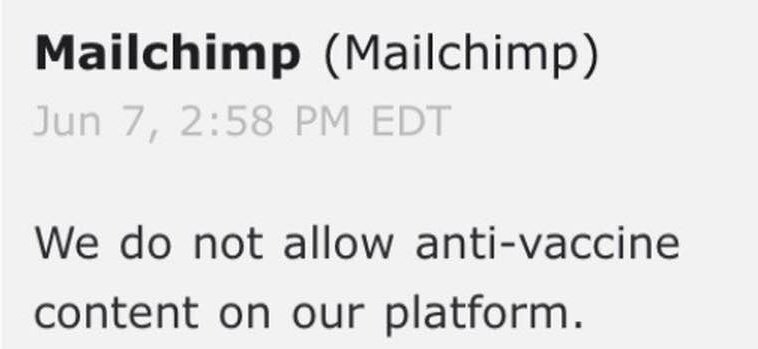
Mailchimp has said they are actively screening ALL accounts for anything that resembles liberty in your healthcare decisions! The company began quietly enforcing this decision last week shutting down access to groups such as Wyoming Health Freedom and Colorado Alliance for Vaccine Choice. https://mailchimp.com/announcements/vaccine-misinformation/
This is an attempt to silence those who call for independently verified science, who point out the proven harmful effects of vaccines on individuals and demand freedom from vaccine mandates. If they had truth and science on their side they wouldn’t need to resort to censorship.
Earlier in 2019, Amazon pulled ‘anti-vaccination’ documentaries from its Prime Video service and several books from its marketplace. Facebook began to stop advertising and is using ‘fact-checking’ as a form of censorship to reduce the visibility of medically proven and science backed vaccine information shared on its platform. See the ‘fact check’ propaganda reveal by Ashley Everly.

YouTube also disabled advertising on “anti-vaccination” videos and lowered in ranking “health misinformation” content in its search results. Pinterest has blocked all vaccine-related search results. Even Etsy has shut down shops of only those who speak against vaccine. Those who produce items that are clearly hate speech exist on the platform.
NBC tells the public that these forms of censorship and violations of speech “have come as a shock to anti-vaccination advocates who for years were served well by recommendation algorithms that boosted controversial and conspiratorial content, such as the underlying and discredited notion that vaccines cause autism, a unifying theory for anti-vaccination groups.”
The spread of truth and information started to strengthen with the advent of social media. It surged to massive proportions with the initiation of school mandates in California in 2015 and continues to spread even in the midst of this ‘outbreak of censorship.’
Could this be because the truth is on the side of those who question vaccine safety?
Three things cannot be long hidden: the sun, the moon, and the truth.

Health Freedom Idaho has already moved to a new platform and our readers, subscribers are encouraged to sign up and stay informed.
Facebook Fact Check Equals Manipulated Masses
Facebook is not only censoring information, they are replacing it with blatant lies created and manipulated to replace factual, objective, honest data. HFI ENCOURAGES our readers to fact-check for themselves. We have included medical journals and scientific resources that clearly contradict the censorship of ‘Facebook Fact-Checkers’.

You know they’re trying to manipulate the masses and keep people believing BLATANT LIES, when they’re putting so much effort into censorship. – Ashley Everly
Current data shows that vaccines are safe and do not cause toxicity or encephalopathy…except when you look at medical journals and vaccine inserts.
Acute encephalopathy following TDAP vaccination:

https://pdfs.semanticscholar.org/…/6a24ee73c82604cdfb19…
Acute encephalopathy followed by permanent brain injury or death associated with further attenuated measles vaccines:

https://www.ncbi.nlm.nih.gov/m/pubmed/9481001/
HHS Vaccine Injury Table:

https://www.hrsa.gov/…/vaccineco…/vaccineinjurytable.pdf

The FDA links to actual manufacturer’s vaccine inserts: https://www.fda.gov/vaccines-blood-biologics/vaccines/vaccines-licensed-use-united-states
Other resources for your ‘fact-checking’ research:
https://www.ncbi.nlm.nih.gov/pmc/articles/PMC4717322/
The denial is getting stronger every day. Like the cigarette companies once did. https://www.ncbi.nlm.nih.gov/pmc/articles/PMC3490543/
HFI isn’t going to last much longer on Facebook – we are already in an echo chamber. 11,000 people follow our page less than several hundred see our posts. Don’t trust FACEBOOK for your facts! Explore the internet. Use DuckDuckgo for your search engine – you find resources that google hides.

Why Facebook Is Taking Sides On Vaccination Information
Wondering why a social media company like FB would state, without irrefutable justification, that antivax info constitutes “misinformation” and is dangerous to society? Why would they care to censor the debate?
Look who is on their board that makes policy decisions.
Turns out there are 8 members on Facebook’s board (including Zuckerberg) and there’s a committee called Finance and Governance (3 members).
The Lead Director of that committee is Dr. Susan Desmond-Hellman. One of the roles of that group is to make Facebook policy.
So who is Dr. Desmond-Hellman?
- She is also CEO of the Gates Foundation.
- Was chancellor at UCSF
- Developed pharmaceutical products at Genentech,
- Worked at Bristol Myers Squib and Proctor and Gamble.
Think she has an opinion on vaccines? Her bias opinion and authority in directing policy attempts to keep legitimate questions about vaccine safety off social media.
Legitimate scientific inquiry into the dangers and/or validity of vaccination is by now voluminous and certainly well known to readers of independent media. Evidently, the fact that a level playing field of information — which is exactly what the Internet was promised to be — is skewing toward anti-vaccination (and other holistic healing) must be worrying to those who rely on the financial support of Big Pharma and establishment medicine.
The fact of the matter is that once someone learns the truth, there is no going back to sleep. The urge to share one’s awareness that is intended to help others who are still unaware is a powerful one. It is, after all, a reason why these “threatening” anti-vaccine messages go viral on social media.
In the meantime, the mothers know that vaccines can be dangerous and no amount of censorship will stop their heartbreak message.
Sign Up and Join Health Freedom Idaho here at our secure censorship free platform. We don’t ‘know how much longer Facebook will allow our message to be heard!
Research completed by:
Hesu Russell Whitten https://www.facebook.com/hesu.whitten
https://www.bloomberg.com/research/stocks/private/person.asp?personId=234101&privcapId=20765463
What is Happening to the First Amendment?
The government is telling private organizations to censor information in direct violation of the Constitution. Rep. Adam Schiff (D-Calif.) petitioned Zuckerberg a private business owner to remove any content that questions vaccines. Groups, pages have been deleted and alogorthims written to keep those sharing science in their own echo chamber. Now he’s doing it with Amazon.
Shiff’s press release states:
As more Americans use the Internet and social media platforms as their primary source of information, it is important that we explore the quality of the information that they receive, particularly on issues that directly impact the health and well-being of Americans, as well as the millions who use your site around the world. Accordingly, I am writing out of my concern that Amazon is surfacing and recommending products and content that discourage parents from vaccinating their children, a direct threat to public health, and reversing progress made in tackling vaccine-preventable diseases.
Documentaries such as Vaxxed or Trace Amounts and Greater Good are no longer available for streaming on Amazon Prime now.
What is being said that is offensive? The truth.
Using statistics, court documents, scientific studies and the billions paid out to families who suffered injury and loss as a direct result of vaccines. Books, documentaries, groups and accounts are being shadow banned and outright censored.

It’s about making sure you have NO ACCESS to information to think for yourself. This is the modern day book burning.
It doesn’t matter if you’re pro vaccine or anti vaccine THERE IS A BIGGER AGENDA HERE! Controlling what we buy, research, watch and so forth. Basically if it doesn’t support big pHARMa then it has to go ((in their minds)) all these companies are being paid off by the pharmaceutical companies and it’s very apparent!
Here is the current list of companies who are censoring medical information that doesn’t align with the pharmaceutical industry profits and agenda.
Amazon (removing books and movies)
Etsy (will not sell homemade products)
Pinterest (deleted entire accounts)
Facebook (deleting groups and accts)
Google, Bing, Yahoo (de-indexing search results, demonitizing)
Instagram (banned accts and hashtags)
YouTube (demonitizing)
Netflix (deleting documentaries)

Drugs, Disease and Deception: Silenced No More
Internationally known biochemist and molecular biologist with more than 33 years of experience Dr Judy Mikovits discovered OUR VACCINES ARE CONTAMINATED WITH RETROVIRUSES. This contamination affects more than 20 million Americans. These retroviruses that lead to a host of chronic illness. The Government covered it up, censored her, destroyed her career, then they quietly used her research to create a filter to ‘clean up’ their contamination while profiting millions on her research. Recently the charges were dropped the gag ordered lifted. She is SILENT NO MORE! Dr Judy Mikovits PhD keynote speaker: Drugs, Disease and Deception: Silenced No More
Purchase Tickets Today Natural Health Symposium

Facebook Deletes Health, Wellness, Organic and Natural Living Accounts in the Name of Fake News
FB announced they were deleting “fake accounts” this week. Zuckerberg himself has announced that he will hire an additional 3,000 employees to shut down ‘fake news’ pages of this platform. Their definition of ‘fake news’ includes groups with labels of organic, natural, traditional, wellness, health and love, brighten my soul. Certainly looks like they’ve targeting deleted anything that threatens the Pharma money flow.

Health Freedom Idaho realized several years ago that Facebook censorship would eventually threaten our ability to share resources and truth. Healthfreedomidaho.org was created with the intention of sharing resources, keeping truth available for all those interested in preserving health freedoms in Idaho and across the U.S.

If you have an article or information you believe would be useful to others instead of sharing it on censor-ridden facebook – consider posting an article RIGHT HERE on hfi.designbyparrish.com/ simply click the contribute button. Articles relating to topics of health freedom, parental rights and toxic exposure are welcome here.
To create an article and contribute content please feel free to use our CONTRIBUTE page. Our editorial staff will review and post it as soon as possible to share with the 77,000 current readers.
Groups Deleted by Facebook as “Fake”
Natural Cures Not Medicine (2.3M followers) – Deleted on June 11th, 2018.

I Want to Be 100% Organic (700K followers) – Deleted on June 13th, 2018.
Collectively Conscious (915K followers) – Deleted on June 13th, 2018.

Viral Alternative News (500K followers) – Deleted on June 13th, 2018.
Organic Health (230K followers) – Deleted on June 13th, 2018.
Natural Cures From Food (120K followers) – Deleted on June 13th, 2018.
Heart Centered Rebalancing (3.9M followers) –
Living Traditionally (570K followers) – Unpublished on June 5th, 2018.
Organic Wellness (600K followers) – Unpublished on June 5th, 2018.
Chocolate Socrates (608K followers) – Deleted on June 13th, 2018.
Earth We Are One
Meditation Masters – Deleted in early June, 2018
Global Freedom Movement (27K followers) – Deleted on June 19th, 2018.
Health & Alternative Medicine (550K followers) – Deleted on June 13th, 2018.
Pure Nature (1.7M followers) – Deleted on June 3rd, 2018.
Nature Gallery (654K followers) – Deleted on June 3rd, 2018.
Mesmerizing Nature (912K followers) – Deleted on June 3rd, 2018.
Nature’s Touch (150K followers) – Deleted on June 3rd, 2018.
Healthy Life Box (1.8M followers) – Deleted on June 13th, 2018.
Healthy Food House (3.4M followers) –
Health Awareness (2.5M followers) –
Healthy Life And Food (350K followers) – Deleted on May 23rd, 2018.
Check These Things (80K followers) – Deleted on June 13th, 2018.
Health Care Above All (90K followers) – Deleted on June 13th, 2018.
Health and Healthy Living (450K followers) –
Health & Alternative Medicine (550K followers) – Deleted on June 13th, 2018.
Healthy Living Motivation (644K followers) – Deleted on June 13th, 2018.
Alternative Health Universe (420K followers) – Deleted on June 13th, 2018.
Natural Medicine Corner (411K followers) – Deleted on June 13th, 2018.
Organic Health Team (490K followers) – Deleted on June 13th, 2018.
Global Health Care (130K followers) – Deleted on June 13th, 2018.
Healthy Alternative Medicine (140K followers) – Deleted on June 13th, 2018.
Natural Healthy Team (190K followers) – Deleted on June 13th, 2018.
Organic Food Medicine (30K followers) – Deleted on June 13th, 2018.
Love, Health and Happiness (10K followers) – Deleted on June 13th, 2018.
Healthy Organic Life (25K followers) – Deleted on June 13th, 2018.
Healthy Lifestyle (55K followers) – Deleted on June 13th, 2018.
Guardian of Health (160K followers) – Deleted on June 13th, 2018.
Daily Health Keeper (190K followers) – Deleted on June 13th, 2018.
Health & Love Page (720K followers) – Deleted on June 5th, 2018.
Diabetes Health Page (180K followers) – Deleted on June 13th, 2018.
The Beauty of Power (170K followers) – Deleted on June 13th, 2018.
Nutrition Facts and Analysys (170K followers) – Deleted on June 13th, 2018.
Deeper Perspectives (32K followers) – Deleted on June 13th, 2018.
My Own Little World (1.5m) – Deleted on June 21, 2018
Brighten Your Soul (100k plus) – Deleted on June 21, 2018
Essence OF Spirit ( 12k) – Deleted on June 21, 2018
We really like animals (544k) – Deleted on June 21, 2018
Nature’s Majesty (191k) – Deleted on June 21, 2018
Nature Magic (33k) – Deleted on June 21, 2018
Floral Photobook (160k) – Deleted on June 21, 2018
People’s Awakening
Nikola Tesla
Interesting Stories
The Warrior
Natural Health Warriors
Tech Explorers
Universe Explorers
Area 51
The Global Meditation
Video Explorers
com
Flower of Life
EWAO
Awareness Act
Conscious Life News
Adam Kiefer thanks

Multiple HFI members LOCKED OUT OF FACEBOOK! #censorship
censorship on facebook locks Executive Director out of her account during CALJAM convention. https://hfi.designbyparrish.com/
Health Freedom Idaho has decided on an alternative social media group on Seen.Life in the event of additional censorship from facebook
-
I was locked out of FB and forced to upload my photo ID to get back on.


#HFI #SpeakTruth and get locked out!
Learn how to get back in after a lock out.